
Stored Procedures in SQL
Stored procedures are program blocks that execute a specific sequence of actions in a database.
Unlike functions, procedures can modify data, perform complex business logic, and don't necessarily return a value.
General Structure of a Stored Procedure
CREATE PROCEDURE procedure_name([[IN | OUT | INOUT] parameter type [, ...]])
BEGIN
    -- procedure logic
END;- [ ]optional part
- a | bone of the options
- ...can be repeated
- procedure_name
- The name you use to call the procedure with CALL.
- IN | OUT | INOUT
The parameter's direction: into the procedure, out of it, or both ways. IN is the default; see below for details.
KeywordOptional- parameter
The parameter name, used to access its value inside the procedure. You can list several parameters separated by commas, or leave the parentheses empty if you need none.
Optional- type
- The parameter's data type: INT, DATE, VARCHAR(50), and so on.
Simple Procedure Example
Let's create a procedure to update student information:
MySQL 8.4-- Create procedure
CREATE PROCEDURE update_student_info(
    IN student_id INT,
    IN new_first_name VARCHAR(50),
    IN new_last_name VARCHAR(50)
)
BEGIN
    UPDATE Student
    SET first_name = new_first_name,
        last_name = new_last_name
    WHERE id = student_id;
END;

-- Call procedure
CALL update_student_info(1, 'Alexander', 'Smirnov');

-- Check the result
SELECT * FROM Student WHERE id = 1;
This procedure takes a student ID and new data, then updates the corresponding record in the Student table.
Types of Procedure Parameters
MySQL procedures support three types of parameters that can be passed to a stored procedure:
- IN — input parameters (default)
- OUT — output parameters for returning values
- INOUT — parameters that can be both input and output
Input Parameters (IN)
Input parameters pass data into the procedure. This is the most common type of parameter:
MySQL 8.4CREATE PROCEDURE add_subject(
    IN subject_id INT,
    IN subject_name VARCHAR(100)
)
BEGIN
    INSERT INTO Subject (id, name)
    VALUES (subject_id, subject_name);
END;

-- Call with input parameters
CALL add_subject(15, 'Mathematics');
Output Parameters (OUT)
Output parameters allow procedures to return values:
MySQL 8.4CREATE PROCEDURE get_student_info(
    IN student_id INT,
    OUT student_name VARCHAR(100),
    OUT student_age INT
)
BEGIN
    SELECT
        CONCAT(first_name, ' ', last_name),
        TIMESTAMPDIFF(YEAR, birthday, CURDATE())
    INTO student_name, student_age
    FROM Student
    WHERE id = student_id;
END;

-- Call procedure with output parameters
CALL get_student_info(1, @name, @age);
SELECT @name AS student_name, @age AS student_age;
Input-Output Parameters (INOUT)
INOUT parameters can accept a value and return a modified value:
MySQL 8.4CREATE PROCEDURE calculate_discount(
    INOUT price DECIMAL(10,2),
    IN discount_percent INT
)
BEGIN
    SET price = price - (price * discount_percent / 100);
END;

-- Using INOUT parameter
SET @original_price = 1000.00;
CALL calculate_discount(@original_price, 15);
SELECT @original_price AS discounted_price;
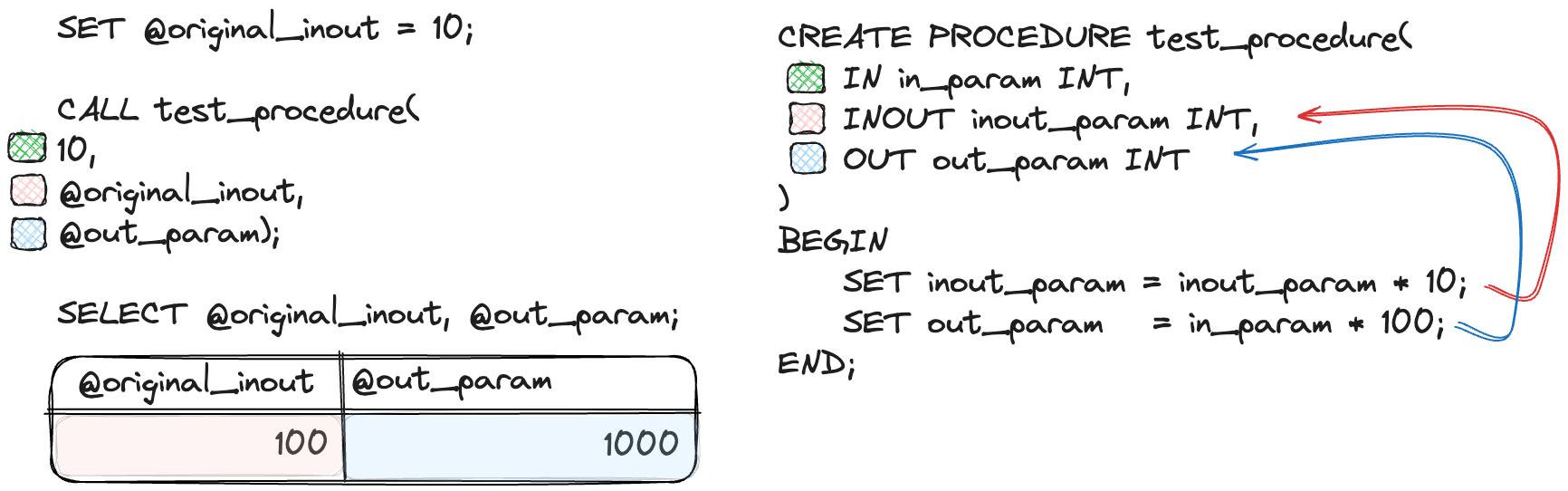
Key Differences Between Parameter Types
Managing Stored Procedures
-
Viewing Existing Procedures
MySQL 8.4SHOW PROCEDURE STATUS WHERE Db = 'your_database_name'; -
Dropping a Procedure
MySQL 8.4DROP PROCEDURE IF EXISTS add_student; -
Modifying a Procedure
To modify a procedure in MySQL, you need to drop the old version first, then create a new one:
MySQL 8.4DROP PROCEDURE IF EXISTS add_student;
-- Create new version of the procedure
CREATE PROCEDURE add_student(...) ...
Stored procedures are a powerful tool for implementing complex business logic directly in the database. They ensure logic centralization, improve performance, and guarantee data integrity! 🚀