
operator HAVING
We have already looked at a query to obtain the average rental cost of residential properties depending on the type of housing:
MySQL 8.4SELECT home_type, AVG(price) as avg_price FROM Rooms
GROUP BY home_type
Let's modify this query so that only those groups whose average cost is greater than 50 are displayed in the final selection.
With our previous experience, there is a great temptation to try to use the WHERE operator for this purpose. But when attempting to execute such a query, the DBMS will inevitably return an error, indicating that we are using the syntax WHERE avg_price > 50 incorrectly.
MySQL 8.4SELECT home_type, AVG(price) as avg_price FROM Rooms
GROUP BY home_type
WHERE avg_price > 50
In advance, to filter groups, we must use the HAVING operator:
MySQL 8.4SELECT home_type, AVG(price) as avg_price FROM Rooms
GROUP BY home_type
HAVING avg_price > 50
Order of execution for SQL queries
But why couldn't we use WHERE, and why do we need a separate operator for this purpose? It all has to do with the order of execution for SQL queries.
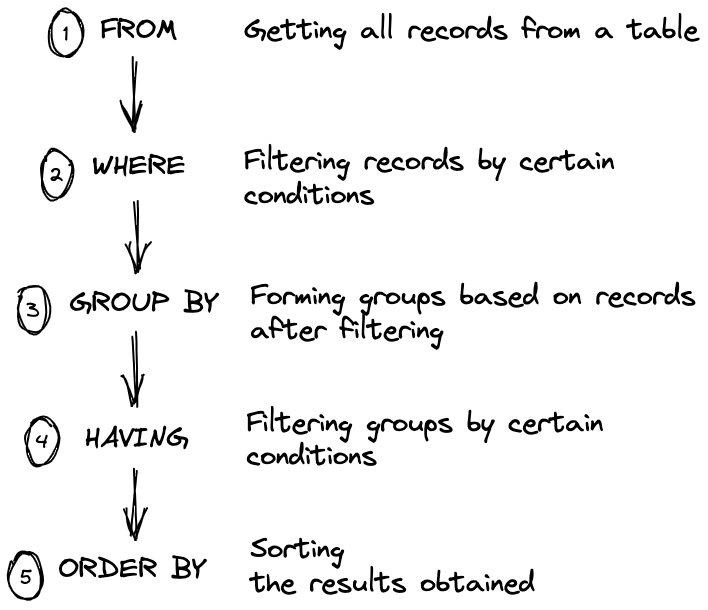
Our first query was incorrect because we tried to use the avg_price field for the formed groups before they were formed, as the execution of the WHERE operator precedes grouping.
That is, the WHERE operator, at the moment of execution, knows nothing about the subsequent grouping; it only works with records from the table. With it, for example, we can filter records from the Rooms table by price before grouping, and only then calculate the average cost of the remaining housing groups:
MySQL 8.4SELECT home_type, AVG(price) as avg_price FROM Rooms
WHERE price > 50
GROUP BY home_type
General Query Structure with HAVING Operator
SELECT select_fields
FROM table_name
[WHERE row_condition]
GROUP BY grouping_field [, ...]
HAVING group_condition
[ORDER BY sort_field];- [ ]optional part
- ...can be repeated
- select_fields
What to output for each group: literals, aggregate functions, and grouping fields.
- table_name
- The table the rows are taken from.
- row_condition
Filters table rows before grouping. You can't use aggregate functions in it.
Optional- grouping_field
The column that splits rows into groups. You can list several columns separated by commas.
- group_condition
Filters groups after grouping, for example COUNT(*) >= 5. You can use aggregate functions in it.
- sort_field
The column or expression the result is sorted by.
Optional
Example of Using HAVING
For example, let's get the minimum cost of each type of housing with a TV. We are only interested in housing types that have at least 5 residential properties associated with them.
To get this result, we must:
-
First get all the data from the table
MySQL 8.4SELECT ... FROM Rooms; -
Then select from all the Room table entries only those that interest us, i.e. only housing with a TV
MySQL 8.4SELECT ... FROM Rooms WHERE has_tv = true -
Then group the data on residential properties by their type
MySQL 8.4SELECT ... FROM Rooms WHERE has_tv = true GROUP BY home_type -
After that, filter the received groups based on the condition that we are interested in groups that have at least 5 representatives
MySQL 8.4SELECT ... FROM Rooms WHERE has_tv = true GROUP BY home_type HAVING COUNT(*) >= 5 -
And finally, to see what is asked of us in the task and accordingly add the output of the necessary information. In our case, we need to output the name of the home type and its minimum cost.
MySQL 8.4SELECT home_type, MIN(price) as min_price FROM Rooms
WHERE has_tv = true
GROUP BY home_type
HAVING COUNT(*) >= 5;