
INNER JOIN
In the previous lesson, we looked at the general structure of a multi-table query:
SELECT table_fields
FROM table_1
[INNER | {LEFT | RIGHT | FULL} [OUTER]] JOIN table_2
    ON join_condition
[...]- [ ]optional part
- { a | b }one of the options
- ...can be repeated
- table_fields
The columns from any of the joined tables that go into the result.
- table_1
- The first table that the other tables are joined to.
- INNER
Inner join: only rows that found a match get into the result. This is the default join type, so you can omit INNER.
KeywordOptional- LEFT | RIGHT | FULL
Outer join: left, right or full. Besides the matched pairs, the result also gets the unmatched rows of the left, the right or both tables.
KeywordOptional- OUTER
Only emphasizes that the join is outer. It goes after LEFT, RIGHT or FULL and does not change the result.
KeywordOptional- table_2
The table being joined. To join more tables, add a separate JOIN ... ON ... for each of them.
- join_condition
The rule by which rows of the two tables find each other, for example Payments.family_member = FamilyMembers.member_id.
When it comes to a multi-table query with an inner join, the general structure looks like this:
SELECT table_fields
FROM table_1
[INNER] JOIN table_2
    ON join_condition
[...]- [ ]optional part
- ...can be repeated
- table_fields
The columns from any of the joined tables that go into the result.
- table_1
- The first table that the other tables are joined to.
- INNER
Inner join: only rows that found a match get into the result. This is the default join type, so you can omit INNER.
KeywordOptional- table_2
The table being joined. To join more tables, add a separate JOIN ... ON ... for each of them.
- join_condition
The rule by which rows of the two tables find each other, for example Payments.family_member = FamilyMembers.member_id.
For example, a query might look like this:
MySQL 8.4SELECT family_member, member_name FROM Payments
INNER JOIN FamilyMembers
    ON Payments.family_member = FamilyMembers.member_id
Concept of inner join
An inner join is a type of join that returns only the rows that have matching values in both tables based on the join condition. It creates a new table that includes fields from both the first and second tables.
Visually, this looks like:
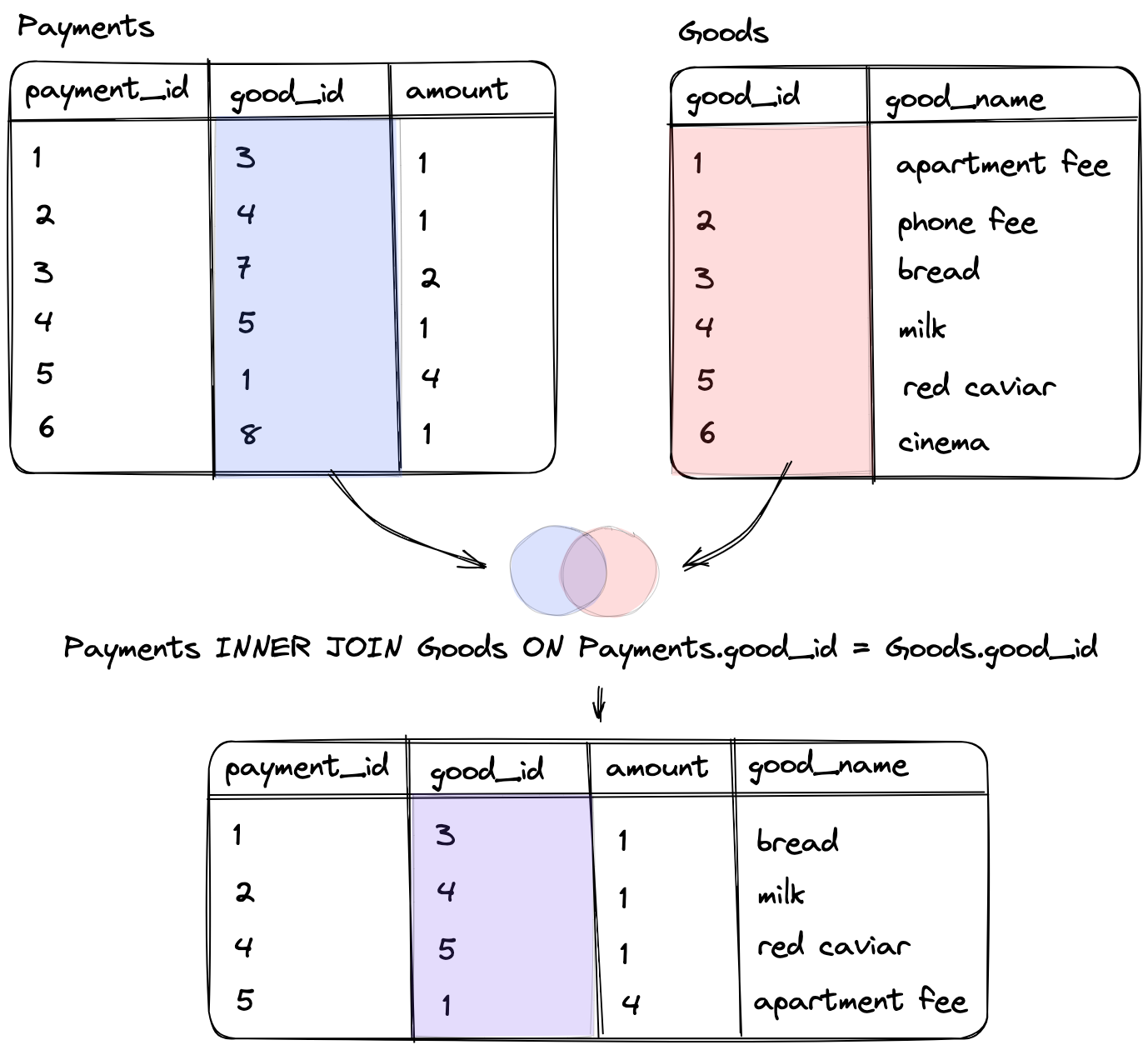
Since our condition specifies that Payments.good_id is equal to Goods.good_id, only the records where both tables have the same good_id value will be included in the resulting query.
Using WHERE to join tables
You can also use the WHERE operator to join tables internally. For example, the above query, written using INNER JOIN, will look like this:
MySQL 8.4SELECT family_member, member_name FROM Payments, FamilyMembers
    WHERE Payments.family_member = FamilyMembers.member_id